
Watchlist Report must be enabled in Company Settings for the user to see the Watchlist tab with the Watchlist Matches option.
Watchlist Matches is available to all user roles, however, Viewer roles will not have access to make changes/edits on this page.
The Watchlist Matches page shows all entities that have returned a potential match. The table is automatically sorted by Match Date and then alphabetically by Name.
The Matches can be filtered by batch or by upload date. You can also search for a specific name using the search functionality. The Generate Report button will generate an Excel file displaying the match information for the filtered results. If no filter is used, then it will generate a report for all entities with a match.

The Matches table displays the following information
- Search Name
- Matched Name
- Score
- Status
- Watchlist
- Date
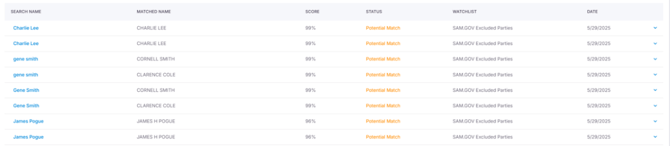
Each match has an expandable option that provides additional details of the match and the option to action that match.
The user will see the notes associated with the match, as well as Aliases and AKAs.
The user can update the status of the potential match to Match or Reviewed. They can also add comments regarding the potential match. Once a status has been updated or a comment entered, the user must click the Save button. At this time the information will update, and that information will show in the Match History, including the date and user who made the change.

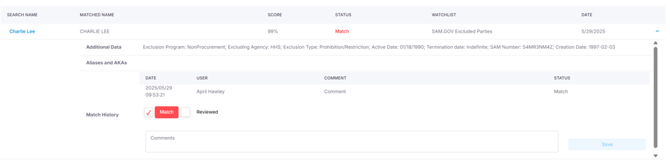
A user can update the status and add additional comments as needed. When the status is updated on the match screen, the change will reflect for that entity and that match on the Entities screen.